> ## Documentation Index
> Fetch the complete documentation index at: https://docs.yambr.com/llms.txt
> Use this file to discover all available pages before exploring further.
# chat.yambr.com
> Hosted Open WebUI with Computer Use pre-installed — the fastest way to try the system end-to-end.
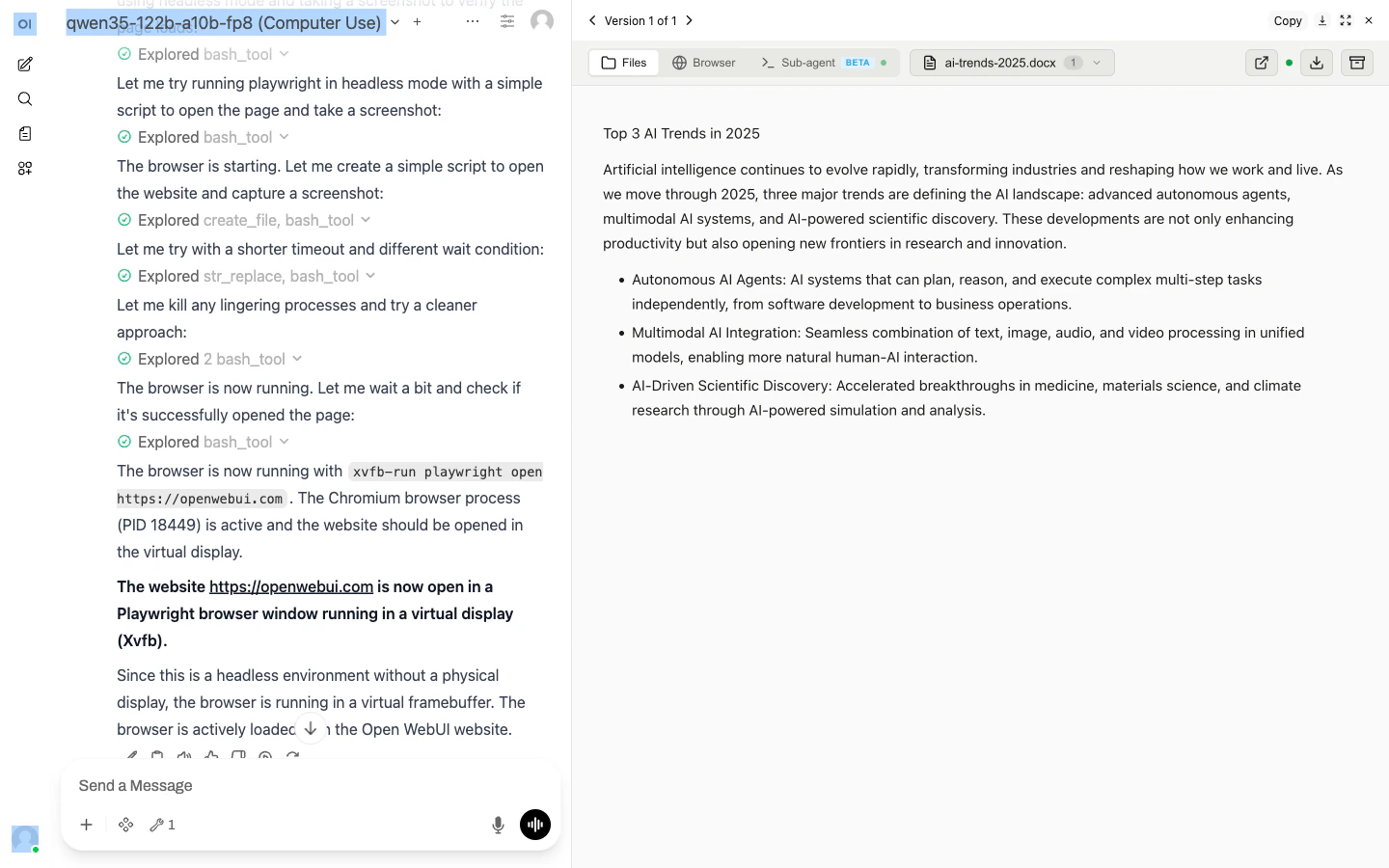 [chat.yambr.com](https://chat.yambr.com/) is a managed [Open WebUI](https://github.com/open-webui/open-webui) instance wired to the Yambr Computer Use backend. Sign in and start chatting — no install, no config.
## What's already done for you
* The Computer Use **tool** is installed and granted to all users.
* The Computer Use **filter** is active and global, so every chat gets the Computer Use system prompt, file-link rewriting, and archive button.
* Open WebUI is built from the patched `openwebui/Dockerfile` (see [Open WebUI integration](/integrations/open-webui)) so artifacts auto-render, previews auto-insert, and large tool results stream through instead of truncating.
* Every model gets `function_calling: native` and `stream_response: true` by default — the two switches without which Computer Use tools silently don't fire.
## Picking a model
The model picker is at the top of every chat — models are pre-configured and ready to use; you don't need to add anything in Workspace. If you'd like a model that isn't listed, [open an issue](https://github.com/Yambr/open-computer-use/issues) or ping us on [Telegram](https://t.me/yambrcom).
## Example prompts
Tasks that showcase different skills:
* **Documents.** *"Create a pitch deck for a fintech seed round, 10 slides, with speaker notes."*
* **Spreadsheets.** *"Open `sales.xlsx`, pivot by region and month, and chart the totals."*
* **Web scraping.** *"Go to Hacker News, grab the top 10 stories, and save them as a Markdown table."*
* **Landing pages.** *"Build a one-pager for a coffee shop called Bean Scene. Dark theme. Show me the preview."*
* **Sub-agent delegation.** *"Clone `https://github.com/org/repo`, run the tests, fix any failures, and show me the diff."*
Each of these picks a different skill — docx, xlsx, playwright-cli, frontend-design, sub-agent — without you having to name them.
## Files and previews
When the model writes a file, a link appears in chat. Click it to download; an iframe preview appears right below the link for supported file types (HTML, PDF, PNG, JPG, ...). Files are served from `cu.yambr.com/files/{chat_id}/...` and scoped to your session.
Upload your own files by dragging them into the chat input. They're mounted read/write into `/home/assistant/uploads/{chat_id}/` inside the sandbox.
## Session isolation
Each Open WebUI chat has its own chat ID. Different chats = different sandbox containers = no state leak. Messages inside the same chat keep the same sandbox, so the model can reference files from earlier turns.
## Terminal tab
Open WebUI exposes a **Terminal** tab per chat. It runs `ttyd + tmux` inside the sandbox, so you can attach to whatever the sub-agent is doing, take over a Claude Code session, or just poke around. See [Terminal](/features/terminal).
## When to self-host instead
Can't send data to the Yambr cloud? Self-host.
You want the Settings Wrapper to store your own skills and PATs.
You want to route to on-prem / bring-your-own model endpoints.
Managed Yambr is the recommended path for most users.
[Self-hosting quickstart →](/install/quickstart)
[chat.yambr.com](https://chat.yambr.com/) is a managed [Open WebUI](https://github.com/open-webui/open-webui) instance wired to the Yambr Computer Use backend. Sign in and start chatting — no install, no config.
## What's already done for you
* The Computer Use **tool** is installed and granted to all users.
* The Computer Use **filter** is active and global, so every chat gets the Computer Use system prompt, file-link rewriting, and archive button.
* Open WebUI is built from the patched `openwebui/Dockerfile` (see [Open WebUI integration](/integrations/open-webui)) so artifacts auto-render, previews auto-insert, and large tool results stream through instead of truncating.
* Every model gets `function_calling: native` and `stream_response: true` by default — the two switches without which Computer Use tools silently don't fire.
## Picking a model
The model picker is at the top of every chat — models are pre-configured and ready to use; you don't need to add anything in Workspace. If you'd like a model that isn't listed, [open an issue](https://github.com/Yambr/open-computer-use/issues) or ping us on [Telegram](https://t.me/yambrcom).
## Example prompts
Tasks that showcase different skills:
* **Documents.** *"Create a pitch deck for a fintech seed round, 10 slides, with speaker notes."*
* **Spreadsheets.** *"Open `sales.xlsx`, pivot by region and month, and chart the totals."*
* **Web scraping.** *"Go to Hacker News, grab the top 10 stories, and save them as a Markdown table."*
* **Landing pages.** *"Build a one-pager for a coffee shop called Bean Scene. Dark theme. Show me the preview."*
* **Sub-agent delegation.** *"Clone `https://github.com/org/repo`, run the tests, fix any failures, and show me the diff."*
Each of these picks a different skill — docx, xlsx, playwright-cli, frontend-design, sub-agent — without you having to name them.
## Files and previews
When the model writes a file, a link appears in chat. Click it to download; an iframe preview appears right below the link for supported file types (HTML, PDF, PNG, JPG, ...). Files are served from `cu.yambr.com/files/{chat_id}/...` and scoped to your session.
Upload your own files by dragging them into the chat input. They're mounted read/write into `/home/assistant/uploads/{chat_id}/` inside the sandbox.
## Session isolation
Each Open WebUI chat has its own chat ID. Different chats = different sandbox containers = no state leak. Messages inside the same chat keep the same sandbox, so the model can reference files from earlier turns.
## Terminal tab
Open WebUI exposes a **Terminal** tab per chat. It runs `ttyd + tmux` inside the sandbox, so you can attach to whatever the sub-agent is doing, take over a Claude Code session, or just poke around. See [Terminal](/features/terminal).
## When to self-host instead
Can't send data to the Yambr cloud? Self-host.
You want the Settings Wrapper to store your own skills and PATs.
You want to route to on-prem / bring-your-own model endpoints.
Managed Yambr is the recommended path for most users.
[Self-hosting quickstart →](/install/quickstart)