> ## Documentation Index
> Fetch the complete documentation index at: https://docs.yambr.com/llms.txt
> Use this file to discover all available pages before exploring further.
# Yambr Open Computer Use
> Give any LLM its own computer — live browser, terminal, code execution, and 13+ document skills, self-hosted or fully managed on Yambr.
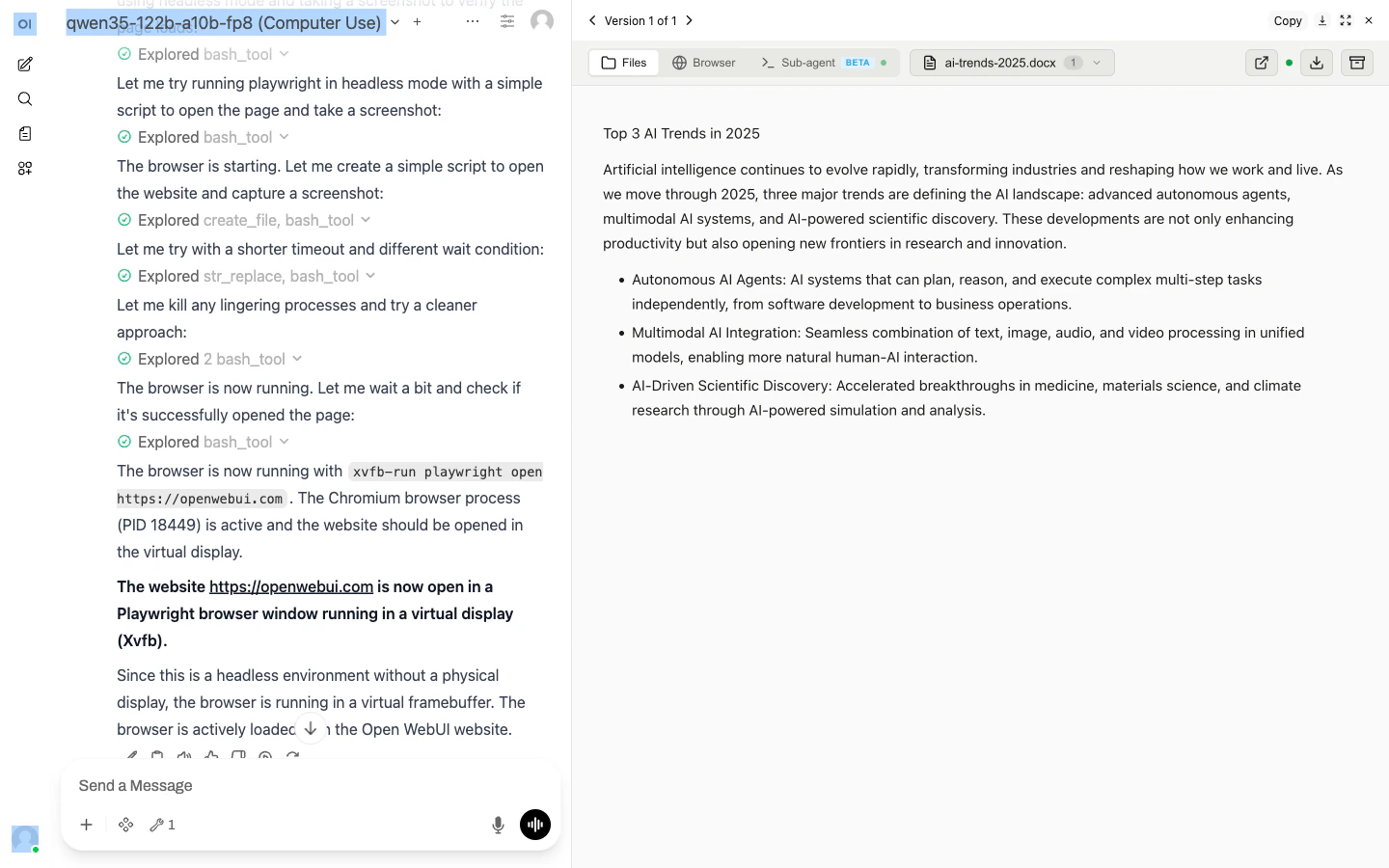 ## What is Open Computer Use?
An MCP server that gives any LLM a fully-equipped Ubuntu sandbox in its own Docker container. Think of it as your AI's computer — it can do everything a developer can do:
* **Execute code** — bash, Python, Node.js, Java, Bun
* **Create documents** — Word, Excel, PowerPoint, PDF with professional styling via skills
* **Browse the web** — Playwright + live CDP browser streaming (you see what the AI sees, in real time)
* **Run Claude Code** — autonomous sub-agent with an interactive terminal; MCP servers auto-configured
* **Use 13+ skills** — battle-tested workflows for document creation, web testing, design, and more
Each chat session runs in its own isolated Docker container. Works with **any MCP-compatible client**: Open WebUI, Claude Desktop, LiteLLM, n8n, or your own integration.
## Two ways to use it
Open [chat.yambr.com](https://chat.yambr.com/) to try it in the browser, or get a key at [app.yambr.com](https://app.yambr.com/) and plug Yambr into your agent stack as an MCP tool server at `https://api.yambr.com/mcp/computer_use`. Bring your own model provider. No servers to run.
Clone [the repo](https://github.com/Yambr/open-computer-use), `docker compose up`. BSL 1.1 / Apache 2.0 / MIT. Tested in production with 1,000+ MAU.
## Try it in 60 seconds
Sign in to [chat.yambr.com](https://chat.yambr.com/) — a hosted Open WebUI with Computer Use already wired up.
> *"Create a professional cover letter in .docx for a Senior Software Engineer applying to a startup."*
The model picks the right skill, writes the file inside its sandbox, and a preview appears inline. Download, share, iterate.
Want to drive it from code? Get a key at [app.yambr.com](https://app.yambr.com/) and register `https://api.yambr.com/mcp/computer_use` as an MCP tool server in Claude Desktop, the OpenAI Agents SDK, Cursor, n8n, or any MCP-capable client. LLM calls stay on *your* provider. See [LiteLLM gateway](/platform/litellm).
## Learn more
The four services — `api`, `app`, `chat`, `cu` — and how they fit together.
What's inside the sandbox, how chats get isolated, how MCP is wired.
13 built-in skills (docx, xlsx, pptx, pdf, playwright, sub-agent, ...) plus 14 examples.
Open WebUI, Claude Desktop, LiteLLM, n8n, or any MCP-over-HTTP client.
## What is Open Computer Use?
An MCP server that gives any LLM a fully-equipped Ubuntu sandbox in its own Docker container. Think of it as your AI's computer — it can do everything a developer can do:
* **Execute code** — bash, Python, Node.js, Java, Bun
* **Create documents** — Word, Excel, PowerPoint, PDF with professional styling via skills
* **Browse the web** — Playwright + live CDP browser streaming (you see what the AI sees, in real time)
* **Run Claude Code** — autonomous sub-agent with an interactive terminal; MCP servers auto-configured
* **Use 13+ skills** — battle-tested workflows for document creation, web testing, design, and more
Each chat session runs in its own isolated Docker container. Works with **any MCP-compatible client**: Open WebUI, Claude Desktop, LiteLLM, n8n, or your own integration.
## Two ways to use it
Open [chat.yambr.com](https://chat.yambr.com/) to try it in the browser, or get a key at [app.yambr.com](https://app.yambr.com/) and plug Yambr into your agent stack as an MCP tool server at `https://api.yambr.com/mcp/computer_use`. Bring your own model provider. No servers to run.
Clone [the repo](https://github.com/Yambr/open-computer-use), `docker compose up`. BSL 1.1 / Apache 2.0 / MIT. Tested in production with 1,000+ MAU.
## Try it in 60 seconds
Sign in to [chat.yambr.com](https://chat.yambr.com/) — a hosted Open WebUI with Computer Use already wired up.
> *"Create a professional cover letter in .docx for a Senior Software Engineer applying to a startup."*
The model picks the right skill, writes the file inside its sandbox, and a preview appears inline. Download, share, iterate.
Want to drive it from code? Get a key at [app.yambr.com](https://app.yambr.com/) and register `https://api.yambr.com/mcp/computer_use` as an MCP tool server in Claude Desktop, the OpenAI Agents SDK, Cursor, n8n, or any MCP-capable client. LLM calls stay on *your* provider. See [LiteLLM gateway](/platform/litellm).
## Learn more
The four services — `api`, `app`, `chat`, `cu` — and how they fit together.
What's inside the sandbox, how chats get isolated, how MCP is wired.
13 built-in skills (docx, xlsx, pptx, pdf, playwright, sub-agent, ...) plus 14 examples.
Open WebUI, Claude Desktop, LiteLLM, n8n, or any MCP-over-HTTP client.