> ## Documentation Index
> Fetch the complete documentation index at: https://docs.yambr.com/llms.txt
> Use this file to discover all available pages before exploring further.
# Terminal tab
> ttyd + tmux + Claude Code CLI in the chat side panel. Attach, take over, leave.
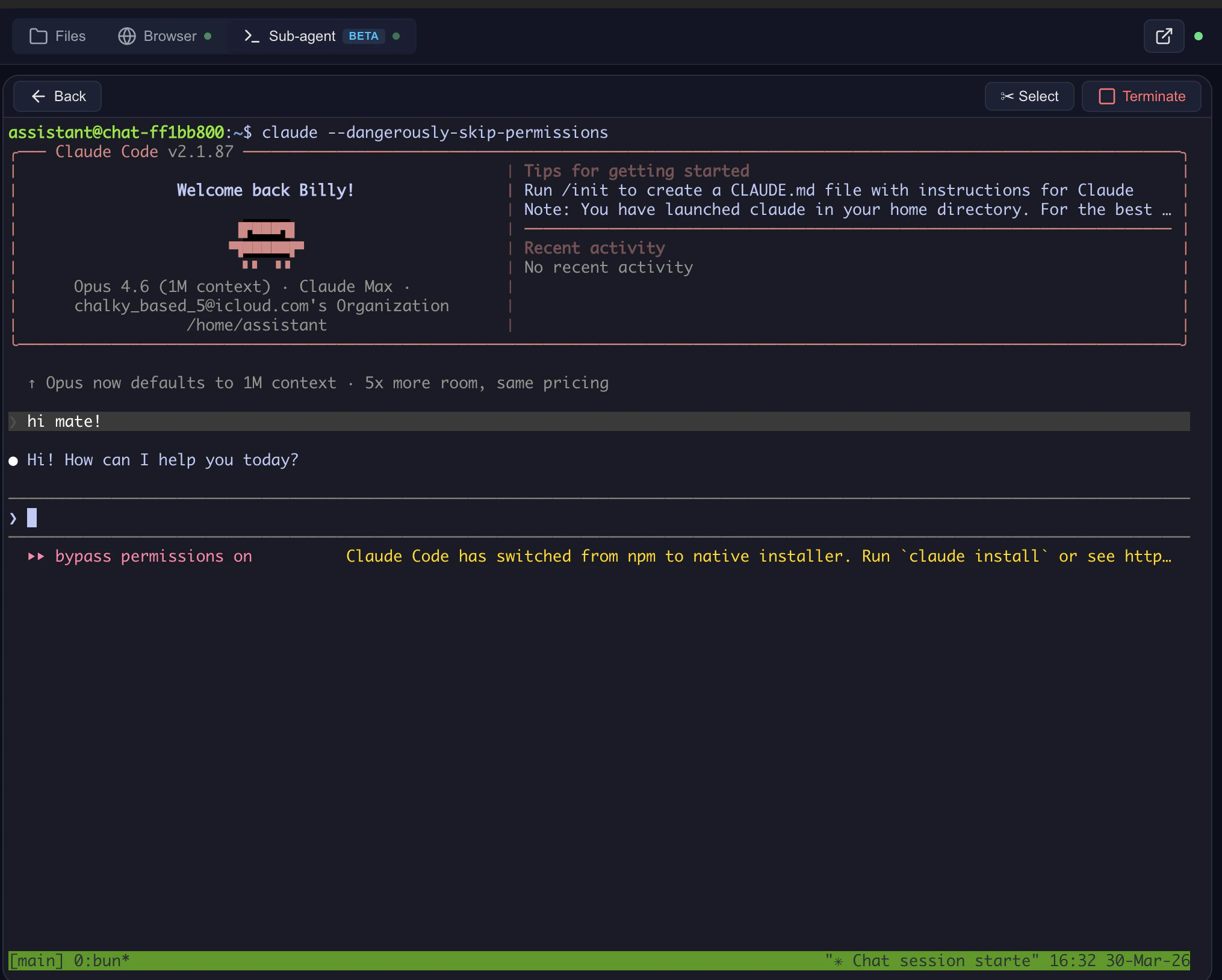 ## What's running
```
Browser (xterm.js) ←WS→ Computer Use Server ←WS→ Sandbox (ttyd:7681)
(proxy on :8081) (tmux + bash)
```
* **ttyd** — WebSocket terminal server inside the sandbox (port 7681)
* **tmux** — persistent session; survives disconnects, scroll history preserved
* **Computer Use Server** — transparent WebSocket proxy
* **xterm.js** — renders in the browser
## Lifecycle
1. Model calls `sub_agent` → sandbox created if it doesn't exist.
2. Filter injects a preview link → side panel opens.
3. User sees the dashboard: running Claude Code processes, saved sessions.
4. Click **Open terminal** → ttyd starts, Claude Code launches.
5. tmux keeps the session alive — disconnect and reconnect freely.
6. Container stays up while the WebSocket is connected (keep-alive heartbeat).
7. Container auto-stops after `CONTAINER_MAX_AGE_HOURS` of idleness.
## Endpoints (self-hosted)
| Endpoint | Purpose |
| ----------------------------------------------- | ------------------------------- |
| `GET /terminal/{chat_id}/status` | Is ttyd running? |
| `POST /terminal/{chat_id}/start-ttyd` | Lazy-start on first click |
| `WS /terminal/{chat_id}/ws` | Terminal WebSocket |
| `GET /terminal/{chat_id}/sessions` | List Claude Code JSONL sessions |
| `GET /terminal/{chat_id}/processes` | List running Claude Code PIDs |
| `POST /terminal/{chat_id}/processes/{pid}/kill` | Kill a stuck process |
## Dangerous mode
Toggle **Skip permission prompts** to run Claude Code without confirmation dialogs. Sets `CLAUDE_AUTOSTARTED=1`. Use only for trusted tasks.
## The escape hatch
You can leave Open WebUI entirely:
* Open the server URL in a new tab.
* Navigate to `/terminal/{chat_id}/` for a full-screen terminal.
* Work with files, run code, use Claude Code — independent of the chat UI.
## Related
* [Sub-agents](/features/sub-agents) — the `sub_agent` tool that owns the terminal
* [Claude Code gateway](/install/configuration#gateway-deploy-routing-claude-through-a-proxy) — routing Claude Code through LiteLLM / Azure / Bedrock
## What's running
```
Browser (xterm.js) ←WS→ Computer Use Server ←WS→ Sandbox (ttyd:7681)
(proxy on :8081) (tmux + bash)
```
* **ttyd** — WebSocket terminal server inside the sandbox (port 7681)
* **tmux** — persistent session; survives disconnects, scroll history preserved
* **Computer Use Server** — transparent WebSocket proxy
* **xterm.js** — renders in the browser
## Lifecycle
1. Model calls `sub_agent` → sandbox created if it doesn't exist.
2. Filter injects a preview link → side panel opens.
3. User sees the dashboard: running Claude Code processes, saved sessions.
4. Click **Open terminal** → ttyd starts, Claude Code launches.
5. tmux keeps the session alive — disconnect and reconnect freely.
6. Container stays up while the WebSocket is connected (keep-alive heartbeat).
7. Container auto-stops after `CONTAINER_MAX_AGE_HOURS` of idleness.
## Endpoints (self-hosted)
| Endpoint | Purpose |
| ----------------------------------------------- | ------------------------------- |
| `GET /terminal/{chat_id}/status` | Is ttyd running? |
| `POST /terminal/{chat_id}/start-ttyd` | Lazy-start on first click |
| `WS /terminal/{chat_id}/ws` | Terminal WebSocket |
| `GET /terminal/{chat_id}/sessions` | List Claude Code JSONL sessions |
| `GET /terminal/{chat_id}/processes` | List running Claude Code PIDs |
| `POST /terminal/{chat_id}/processes/{pid}/kill` | Kill a stuck process |
## Dangerous mode
Toggle **Skip permission prompts** to run Claude Code without confirmation dialogs. Sets `CLAUDE_AUTOSTARTED=1`. Use only for trusted tasks.
## The escape hatch
You can leave Open WebUI entirely:
* Open the server URL in a new tab.
* Navigate to `/terminal/{chat_id}/` for a full-screen terminal.
* Work with files, run code, use Claude Code — independent of the chat UI.
## Related
* [Sub-agents](/features/sub-agents) — the `sub_agent` tool that owns the terminal
* [Claude Code gateway](/install/configuration#gateway-deploy-routing-claude-through-a-proxy) — routing Claude Code through LiteLLM / Azure / Bedrock