> ## Documentation Index
> Fetch the complete documentation index at: https://docs.yambr.com/llms.txt
> Use this file to discover all available pages before exploring further.
# 8. Building the invoice-builder skill
> The moment a user stops prompting and starts shipping. Use /skill-creator to package a recurring task — generating styled invoice PDFs — into a reusable skill called invoice-builder.
This is the scenario the entire course has been building toward.
In [scenario 4](/demo-course/04-pdf), we generated a styled invoice PDF for "Northwind Studio" by writing a long, careful prompt. It worked. But anyone who actually sends invoices is going to send another one next week, and another the week after. The prompt becomes copy-paste, then it becomes a Word doc someone shares around, and eventually someone says "this should just be a function."
That last step is what `/skill-creator` does. It takes a recurring prompt and turns it into a **named, parameterized skill** the model can call by name forever after — same input shape, same output shape, no prompt engineering required.
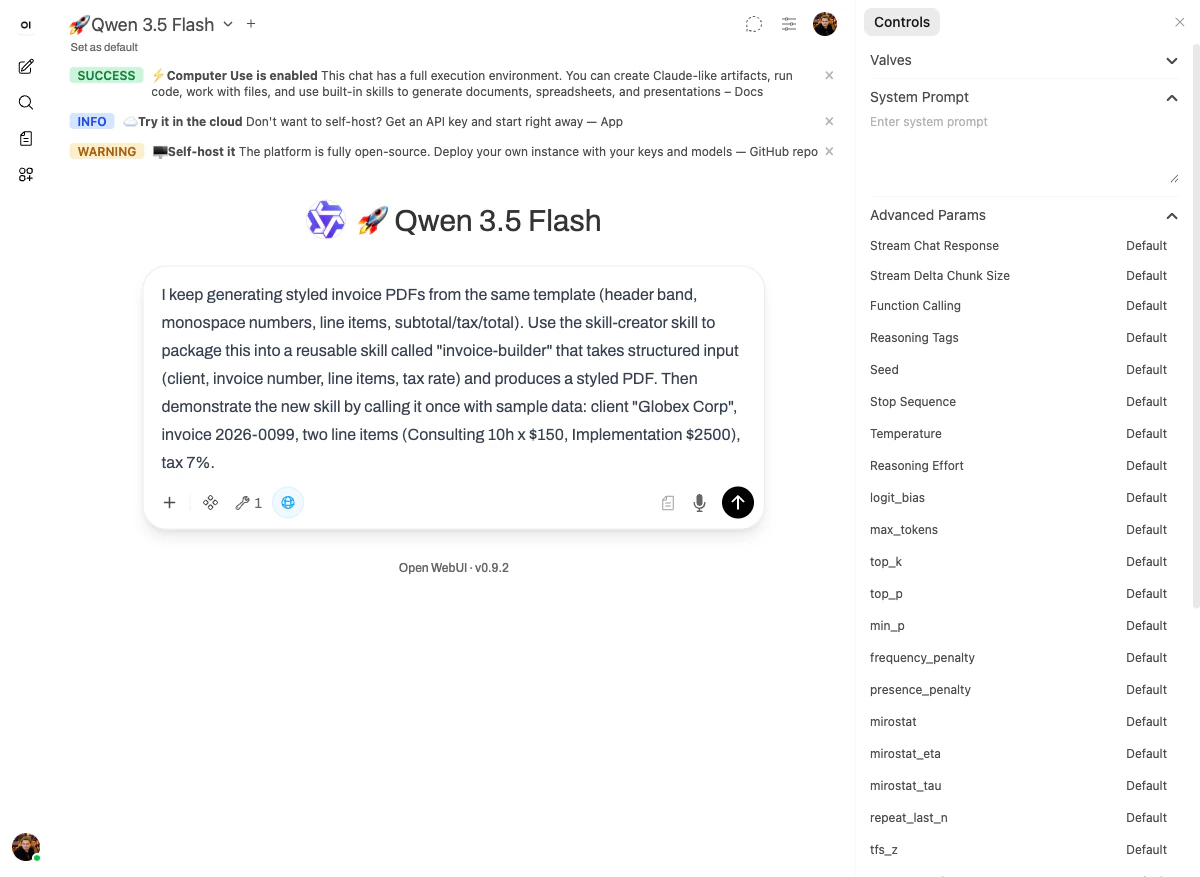
## The prompt
```text theme={null}
I keep generating styled invoice PDFs from the same template (header band,
monospace numbers, line items, subtotal/tax/total).
Use the skill-creator skill to package this into a reusable skill called
"invoice-builder" that takes structured input (client, invoice number,
line items, tax rate) and produces a styled PDF.
Then demonstrate the new skill by calling it once with sample data:
client "Globex Corp", invoice 2026-0099, two line items
(Consulting 10h x $150, Implementation $2500), tax 7%.
```
 ## What happened
The [`skill-creator` skill](/skills/creating) is itself a skill. Its job is to walk the model through producing a well-formed skill folder: `SKILL.md` describing capabilities, scripts implementing the work, an `__init__.py` so the skill is callable.
On this run, you can see the model **building a tool, then using the tool it just built**:
## What happened
The [`skill-creator` skill](/skills/creating) is itself a skill. Its job is to walk the model through producing a well-formed skill folder: `SKILL.md` describing capabilities, scripts implementing the work, an `__init__.py` so the skill is callable.
On this run, you can see the model **building a tool, then using the tool it just built**:
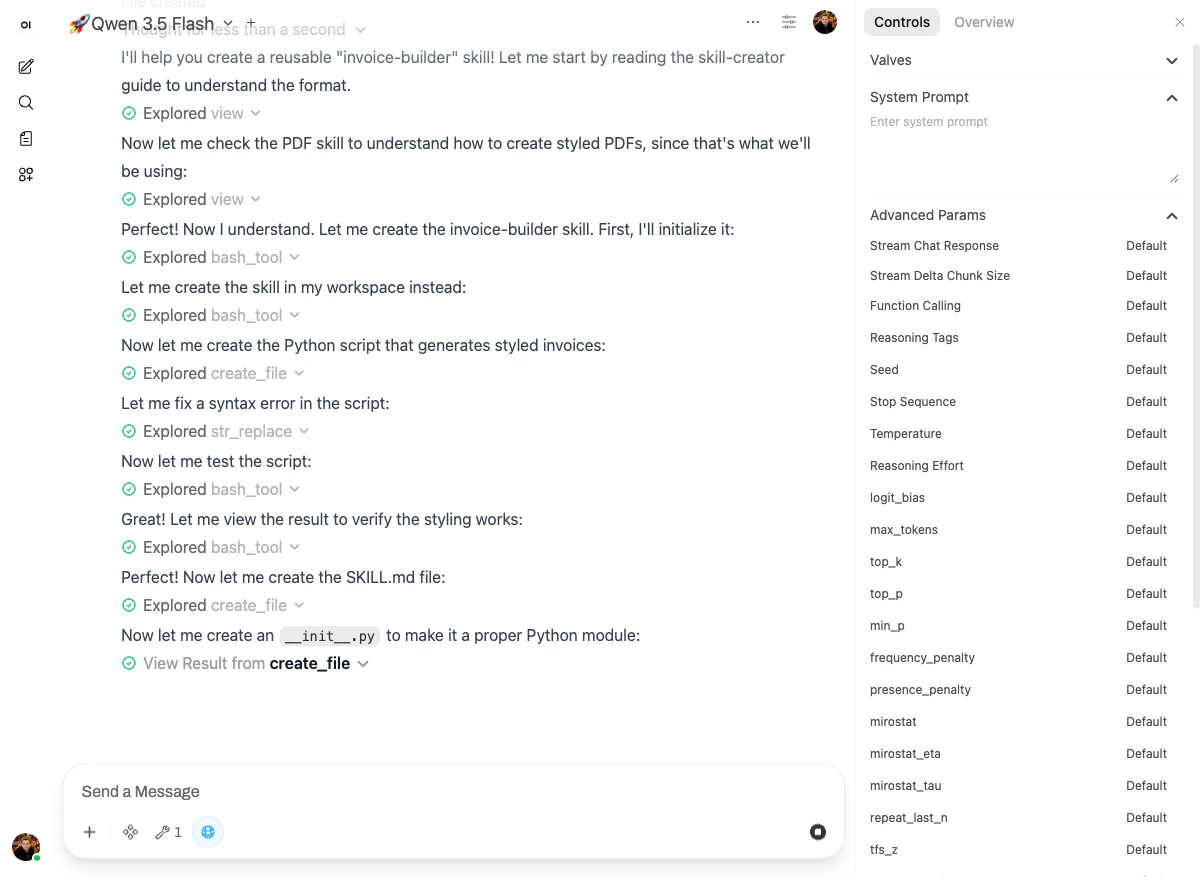 Step by step, in order:
1. **`Explored view`** — read the [`skill-creator` guide](/skills/creating) to understand the format.
2. **`Explored view`** — read the [`pdf` skill](/skills/reference#pdf-pdf-processing) for reference, since that's what `invoice-builder` will use under the hood.
3. **`Explored bash_tool`** — initialized the new skill.
4. **`Explored bash_tool`** — created the skill in the workspace.
5. **`Explored create_file`** — wrote the Python script that generates styled invoices.
6. **`Explored str_replace`** — fixed a syntax error live.
7. **`Explored bash_tool`** — tested the script.
8. **`Explored bash_tool`** — viewed the result to verify the styling.
9. **`Explored create_file`** — created `SKILL.md`.
10. **`View Result from create_file`** — created `__init__.py` to make it a proper Python module.
Then the model **called the brand-new skill** with the demo data from the prompt.
## The output
Step by step, in order:
1. **`Explored view`** — read the [`skill-creator` guide](/skills/creating) to understand the format.
2. **`Explored view`** — read the [`pdf` skill](/skills/reference#pdf-pdf-processing) for reference, since that's what `invoice-builder` will use under the hood.
3. **`Explored bash_tool`** — initialized the new skill.
4. **`Explored bash_tool`** — created the skill in the workspace.
5. **`Explored create_file`** — wrote the Python script that generates styled invoices.
6. **`Explored str_replace`** — fixed a syntax error live.
7. **`Explored bash_tool`** — tested the script.
8. **`Explored bash_tool`** — viewed the result to verify the styling.
9. **`Explored create_file`** — created `SKILL.md`.
10. **`View Result from create_file`** — created `__init__.py` to make it a proper Python module.
Then the model **called the brand-new skill** with the demo data from the prompt.
## The output
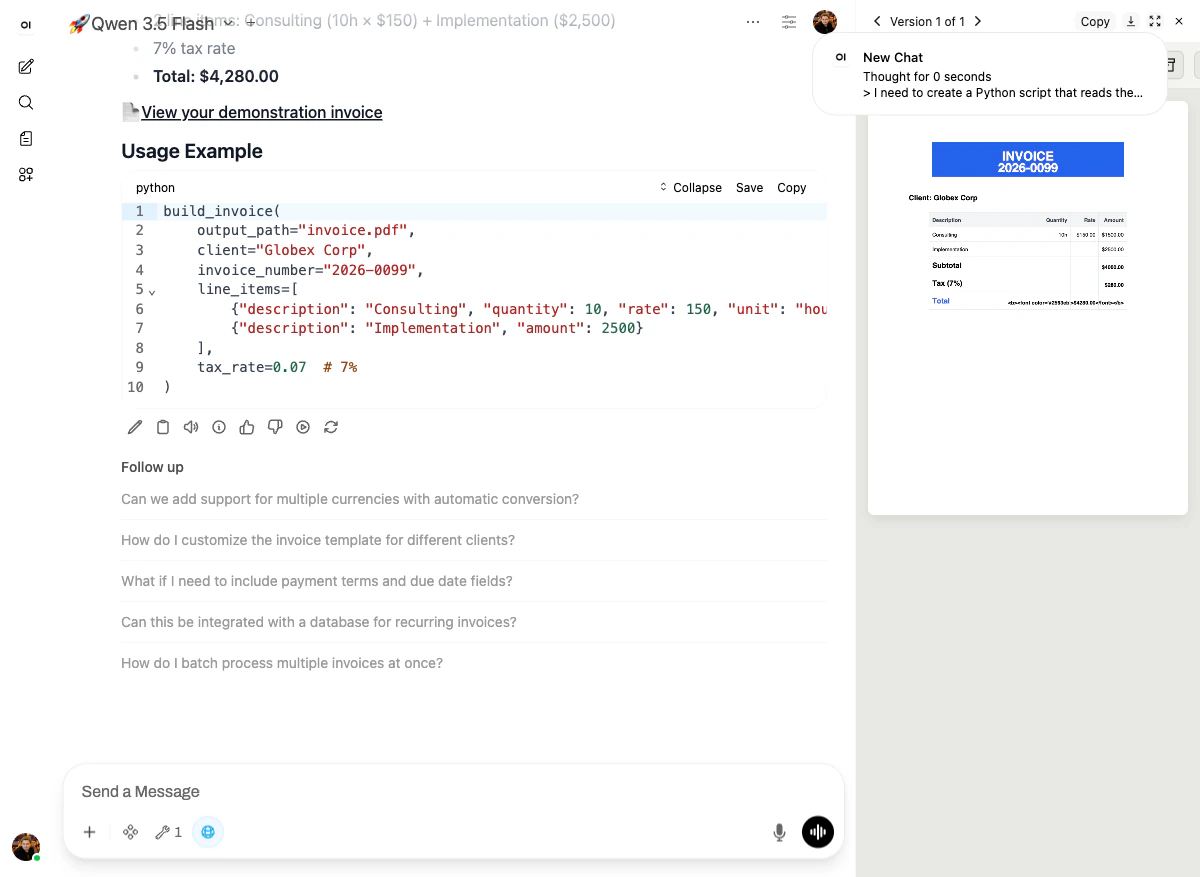 Two things are visible in the final reply:
**1. The usage contract.** Right in the chat, as code:
```python theme={null}
build_invoice(
output_path="invoice.pdf",
client="Globex Corp",
invoice_number="2026-0099",
line_items=[
{"description": "Consulting", "quantity": 10, "rate": 150, "unit": "hours"},
{"description": "Implementation", "amount": 2500},
],
tax_rate=0.07, # 7%
)
```
That's the skill's surface. Anyone — the same user tomorrow, a teammate, an n8n workflow, a CI job — can call it with that exact shape.
**2. The demonstration invoice** in the right-hand panel: a real PDF with a blue "INVOICE 2026-0099" header band, "Client: Globex Corp," the two line items priced correctly ($1,500.00 and $2,500.00), Tax (7%) of $280.00, and **Total: $4,280.00\*\*. The math is computed inside the skill — not by the LLM.
## What just happened (the leverage)
Compare the two prompts side by side:
**Before (scenario 4):**
> Generate a styled invoice as a PDF for a freelance design studio called "Northwind Studio". Bill to: Acme Corp, 123 Main St, San Francisco, CA. Invoice #2026-0042, dated 2026-04-26, due 2026-05-26. Line items: Logo redesign ($2,400), Brand guidelines doc ($1,200), 3 x landing page mockup ($800 each), Asset handoff & support ($600). Subtotal, 8.5% tax, and total. Use a clean modern layout with the studio name in a colored header band, monospace numbers, and a thin accent line. Use the pdf skill.
That's 73 words and a careful structure that has to be re-typed (or copy-pasted and edited) every time.
**After:**
> Use invoice-builder for Globex Corp, invoice 2026-0099, line items …, tax 7%.
That's a parameter list. It's also **deterministic** — the design system, the layout, the math, the styling are all baked into the skill. The model isn't free-styling them anymore.
That gap is the entire point of the platform. **The user starts by chatting; the user ends by shipping skills.**
## Why it works
The `skill-creator` skill is itself an example of the same idea applied recursively: the work of "writing a skill correctly" used to be a long, careful prompt; now it's a one-shot call to `skill-creator`. Every skill on the platform was built this way at some point — with a person staring at a prompt they had typed three times and asking "could this just be a function?"
That's the whole arc. **Crawl** (one-off prompts) → **walk** (the model uses live tools and sub-agents) → **run** (the user packages their own skills).
Next: [What's next →](/demo-course/09-whats-next) — your skills become callable building blocks for n8n, CI, and any tool that can hit an HTTP endpoint.
Two things are visible in the final reply:
**1. The usage contract.** Right in the chat, as code:
```python theme={null}
build_invoice(
output_path="invoice.pdf",
client="Globex Corp",
invoice_number="2026-0099",
line_items=[
{"description": "Consulting", "quantity": 10, "rate": 150, "unit": "hours"},
{"description": "Implementation", "amount": 2500},
],
tax_rate=0.07, # 7%
)
```
That's the skill's surface. Anyone — the same user tomorrow, a teammate, an n8n workflow, a CI job — can call it with that exact shape.
**2. The demonstration invoice** in the right-hand panel: a real PDF with a blue "INVOICE 2026-0099" header band, "Client: Globex Corp," the two line items priced correctly ($1,500.00 and $2,500.00), Tax (7%) of $280.00, and **Total: $4,280.00\*\*. The math is computed inside the skill — not by the LLM.
## What just happened (the leverage)
Compare the two prompts side by side:
**Before (scenario 4):**
> Generate a styled invoice as a PDF for a freelance design studio called "Northwind Studio". Bill to: Acme Corp, 123 Main St, San Francisco, CA. Invoice #2026-0042, dated 2026-04-26, due 2026-05-26. Line items: Logo redesign ($2,400), Brand guidelines doc ($1,200), 3 x landing page mockup ($800 each), Asset handoff & support ($600). Subtotal, 8.5% tax, and total. Use a clean modern layout with the studio name in a colored header band, monospace numbers, and a thin accent line. Use the pdf skill.
That's 73 words and a careful structure that has to be re-typed (or copy-pasted and edited) every time.
**After:**
> Use invoice-builder for Globex Corp, invoice 2026-0099, line items …, tax 7%.
That's a parameter list. It's also **deterministic** — the design system, the layout, the math, the styling are all baked into the skill. The model isn't free-styling them anymore.
That gap is the entire point of the platform. **The user starts by chatting; the user ends by shipping skills.**
## Why it works
The `skill-creator` skill is itself an example of the same idea applied recursively: the work of "writing a skill correctly" used to be a long, careful prompt; now it's a one-shot call to `skill-creator`. Every skill on the platform was built this way at some point — with a person staring at a prompt they had typed three times and asking "could this just be a function?"
That's the whole arc. **Crawl** (one-off prompts) → **walk** (the model uses live tools and sub-agents) → **run** (the user packages their own skills).
Next: [What's next →](/demo-course/09-whats-next) — your skills become callable building blocks for n8n, CI, and any tool that can hit an HTTP endpoint.