> ## Documentation Index
> Fetch the complete documentation index at: https://docs.yambr.com/llms.txt
> Use this file to discover all available pages before exploring further.
# 6. Roasthaus landing page
> A single-page artisan coffee shop landing rendered live in the browser tab next to the chat — generated by the frontend-design skill.
This is the first scenario where the platform's [live browser](/features/browser) becomes load-bearing. Most chat UIs can produce HTML and show you a code block. Computer Use can produce HTML, **serve it on `localhost`, and show you the rendered page in the right-hand panel** while you keep chatting. The user sees the design at the same time as the explanation.
## The prompt
```text theme={null}
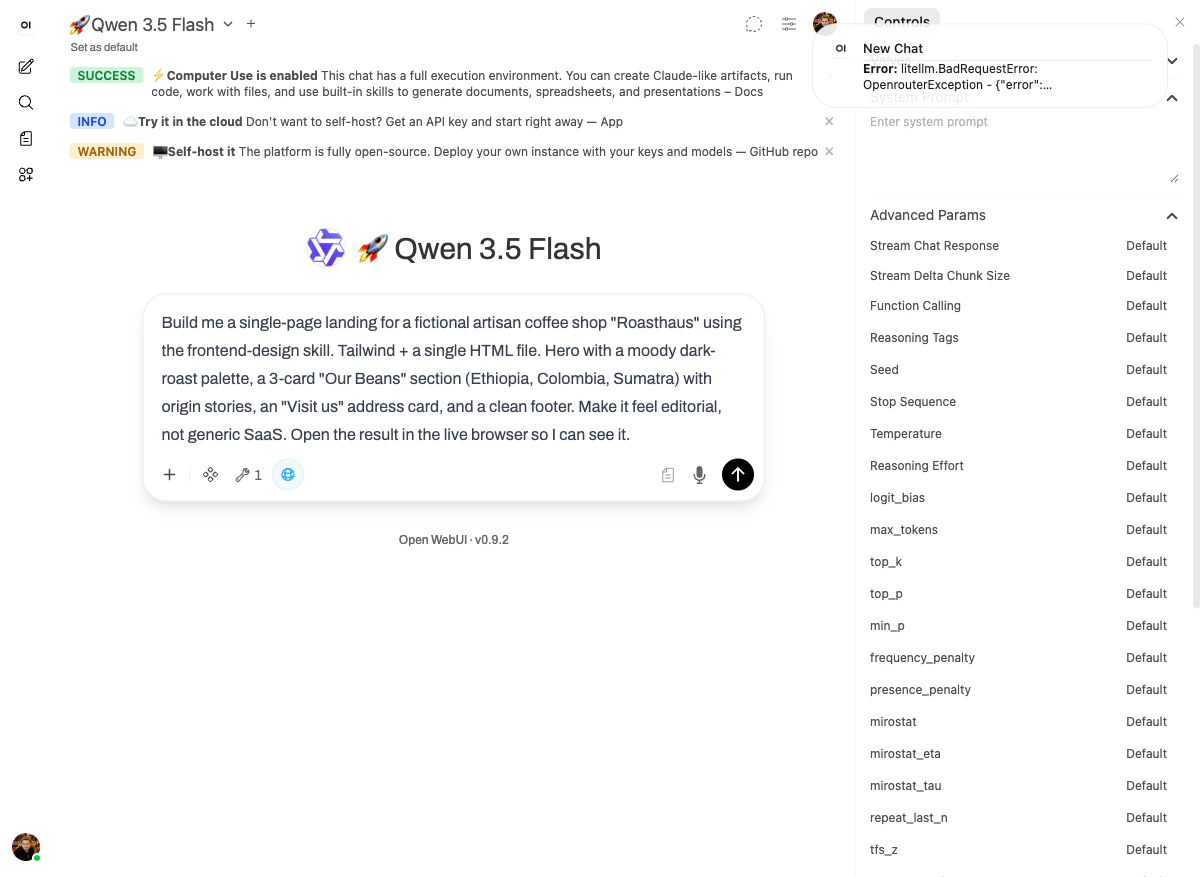
Build me a single-page landing for a fictional artisan coffee shop "Roasthaus"
using the frontend-design skill. Tailwind + a single HTML file.
Hero with a moody dark-roast palette, a 3-card "Our Beans" section
(Ethiopia, Colombia, Sumatra) with origin stories, a "Visit us" address
card, and a clean footer. Make it feel editorial, not generic SaaS.
Open the result in the live browser so I can see it.
```
 ## What happened
The [`frontend-design` skill](/skills/reference#frontend-design-production-grade-ui) is opinionated about one thing: **the result should not look like generic AI output**. It nudges the model toward editorial typography, distinctive palettes, and intentional layout — instead of the bland Tailwind defaults that come out of a one-shot prompt.
Concretely, on this run the model:
1. Read the `frontend-design` skill's reference materials (`Explored str_replace, view`).
2. Spawned a [sub-agent](/features/sub-agents) to build out specific sections in parallel — the green `Sub-agent` indicator was visible in the right-hand panel during the run.
3. Wrote a single self-contained HTML file with embedded Tailwind.
4. Started a local HTTP server on port 8080 inside the sandbox.
5. Opened `http://localhost:8080/roasthaus.html` in the live browser tab.
6. Took a screenshot to verify the design rendered correctly.
The reasoning was explicit:
> Now I'll create a moody, editorial landing page for Roasthaus with a dark roast aesthetic, custom typography, and distinctive design that avoids generic SaaS looks.
## The output
## What happened
The [`frontend-design` skill](/skills/reference#frontend-design-production-grade-ui) is opinionated about one thing: **the result should not look like generic AI output**. It nudges the model toward editorial typography, distinctive palettes, and intentional layout — instead of the bland Tailwind defaults that come out of a one-shot prompt.
Concretely, on this run the model:
1. Read the `frontend-design` skill's reference materials (`Explored str_replace, view`).
2. Spawned a [sub-agent](/features/sub-agents) to build out specific sections in parallel — the green `Sub-agent` indicator was visible in the right-hand panel during the run.
3. Wrote a single self-contained HTML file with embedded Tailwind.
4. Started a local HTTP server on port 8080 inside the sandbox.
5. Opened `http://localhost:8080/roasthaus.html` in the live browser tab.
6. Took a screenshot to verify the design rendered correctly.
The reasoning was explicit:
> Now I'll create a moody, editorial landing page for Roasthaus with a dark roast aesthetic, custom typography, and distinctive design that avoids generic SaaS looks.
## The output
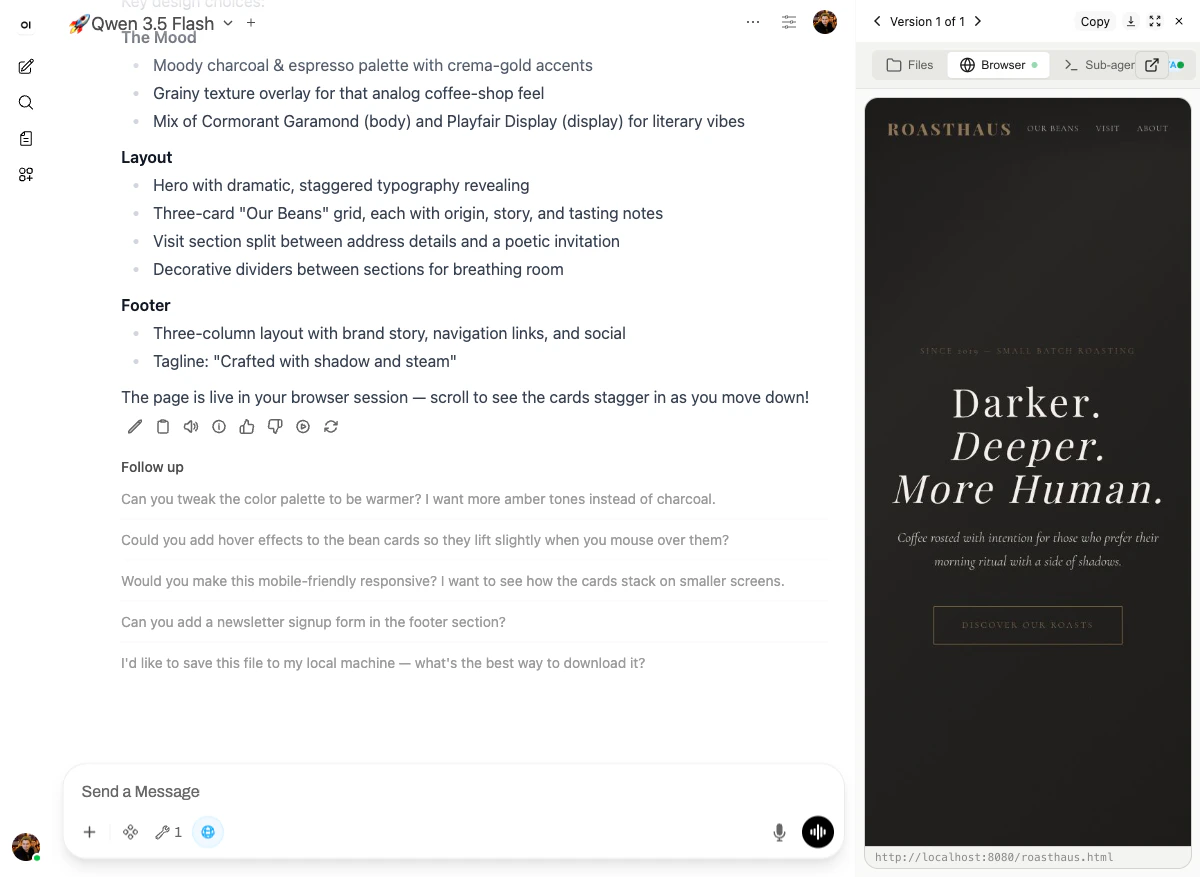 The page in the right-hand panel speaks for itself:
* **`ROASTHAUS`** in monospaced serifs, navigation: OUR BEANS / VISIT / ABOUT
* A small caption reading **"SINCE 2019 — SMALL BATCH ROASTING"**
* The hero headline: **"Darker. Deeper. More Human."** rendered in a display serif (Playfair Display) at editorial scale
* Subhead: *"Coffee roasted with intention for those who prefer their morning ritual with a side of shadows."*
* A "DISCOVER OUR ROASTS" call-to-action with a thin black border instead of the usual loud filled button
The reply enumerates the design system:
* **The Mood:** moody charcoal & espresso palette with crema-gold accents · grainy texture overlay for an analog coffee-shop feel · Cormorant Garamond (body) and Playfair Display (display) for literary vibes.
* **Layout:** hero with dramatic, staggered typography reveals · three-card "Our Beans" grid with origin, story, and tasting notes · Visit section split between address details and a poetic invitation · decorative dividers between sections for breathing room.
* **Footer:** three-column with brand story, navigation links, and social. Tagline: *"Crafted with shadow and steam."*
And, crucially:
> The page is live in your browser session — scroll to see the cards stagger in as you move down!
This is the demo working as intended: the user is **looking at the actual product** and can interact with it (scroll, click, inspect) without leaving the chat.
## Why it works
Three platform features lock in here:
1. **The `frontend-design` skill** provides design-system patterns (typography pairs, palette templates, layout grids) that resist regression to generic AI output.
2. **The [terminal](/features/terminal)** lets the model start a dev server and serve the file.
3. **The [live browser](/features/browser)** loads the served URL and renders it in a panel beside the chat — so the user can see and interact with the result in real time.
The combination is what's distinctive. A "design assistant" that just emits a code block is leaving 80% of the value on the table. The user wants to *see the page*, and ideally **scroll it, resize it, click around**. That's only possible if the model has a sandbox with a browser inside it.
Next: [Hacker News AI digest →](/demo-course/07-browser)
The page in the right-hand panel speaks for itself:
* **`ROASTHAUS`** in monospaced serifs, navigation: OUR BEANS / VISIT / ABOUT
* A small caption reading **"SINCE 2019 — SMALL BATCH ROASTING"**
* The hero headline: **"Darker. Deeper. More Human."** rendered in a display serif (Playfair Display) at editorial scale
* Subhead: *"Coffee roasted with intention for those who prefer their morning ritual with a side of shadows."*
* A "DISCOVER OUR ROASTS" call-to-action with a thin black border instead of the usual loud filled button
The reply enumerates the design system:
* **The Mood:** moody charcoal & espresso palette with crema-gold accents · grainy texture overlay for an analog coffee-shop feel · Cormorant Garamond (body) and Playfair Display (display) for literary vibes.
* **Layout:** hero with dramatic, staggered typography reveals · three-card "Our Beans" grid with origin, story, and tasting notes · Visit section split between address details and a poetic invitation · decorative dividers between sections for breathing room.
* **Footer:** three-column with brand story, navigation links, and social. Tagline: *"Crafted with shadow and steam."*
And, crucially:
> The page is live in your browser session — scroll to see the cards stagger in as you move down!
This is the demo working as intended: the user is **looking at the actual product** and can interact with it (scroll, click, inspect) without leaving the chat.
## Why it works
Three platform features lock in here:
1. **The `frontend-design` skill** provides design-system patterns (typography pairs, palette templates, layout grids) that resist regression to generic AI output.
2. **The [terminal](/features/terminal)** lets the model start a dev server and serve the file.
3. **The [live browser](/features/browser)** loads the served URL and renders it in a panel beside the chat — so the user can see and interact with the result in real time.
The combination is what's distinctive. A "design assistant" that just emits a code block is leaving 80% of the value on the table. The user wants to *see the page*, and ideally **scroll it, resize it, click around**. That's only possible if the model has a sandbox with a browser inside it.
Next: [Hacker News AI digest →](/demo-course/07-browser)