> ## Documentation Index
> Fetch the complete documentation index at: https://docs.yambr.com/llms.txt
> Use this file to discover all available pages before exploring further.
# 4. Freelance invoice (PDF)
> A styled PDF invoice with a colored header band, monospace numbers, line items, and live tax math — generated by the pdf skill.
PDFs are a different beast from `.docx` or `.xlsx`. The user almost never wants to *edit* the output — they want to **send it to someone**. So the bar is "this looks like it came out of a design tool, not a spreadsheet." The `pdf` skill is built around producing files that meet that bar, not just rendering text into a page.
## The prompt
```text theme={null}
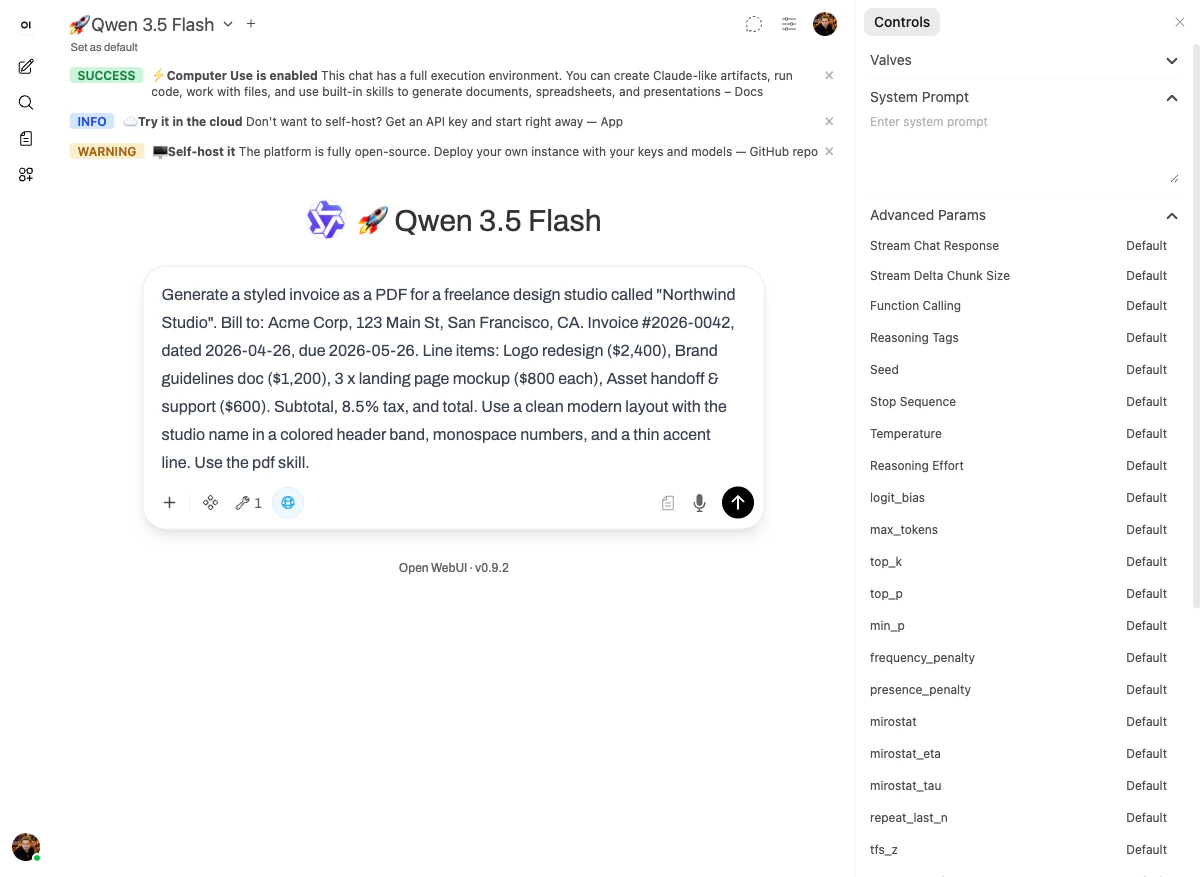
Generate a styled invoice as a PDF for a freelance design studio called "Northwind Studio".
Bill to: Acme Corp, 123 Main St, San Francisco, CA.
Invoice #2026-0042, dated 2026-04-26, due 2026-05-26.
Line items:
- Logo redesign ($2,400)
- Brand guidelines doc ($1,200)
- 3 x landing page mockup ($800 each)
- Asset handoff & support ($600).
Subtotal, 8.5% tax, and total.
Use a clean modern layout with the studio name in a colored header band,
monospace numbers, and a thin accent line. Use the pdf skill.
```
 ## What happened
The [`pdf` skill](/skills/reference#pdf-pdf-processing) gives the model two things at once: a renderer for new PDFs and a manipulator for existing ones (filling forms, splitting, merging). For an invoice, only the renderer matters.
The model produced the file, opened it back to verify the layout (`Explored bash_tool, Explored bash_tool` — that's "render → re-open → check"), and confirmed:
> Perfect! The invoice PDF has been created successfully.
The math is also visible in the reply: **subtotal $6,600, tax (8.5%) $561.00, TOTAL \$7,161.00** — matching exactly what the line items add up to.
## The output
## What happened
The [`pdf` skill](/skills/reference#pdf-pdf-processing) gives the model two things at once: a renderer for new PDFs and a manipulator for existing ones (filling forms, splitting, merging). For an invoice, only the renderer matters.
The model produced the file, opened it back to verify the layout (`Explored bash_tool, Explored bash_tool` — that's "render → re-open → check"), and confirmed:
> Perfect! The invoice PDF has been created successfully.
The math is also visible in the reply: **subtotal $6,600, tax (8.5%) $561.00, TOTAL \$7,161.00** — matching exactly what the line items add up to.
## The output
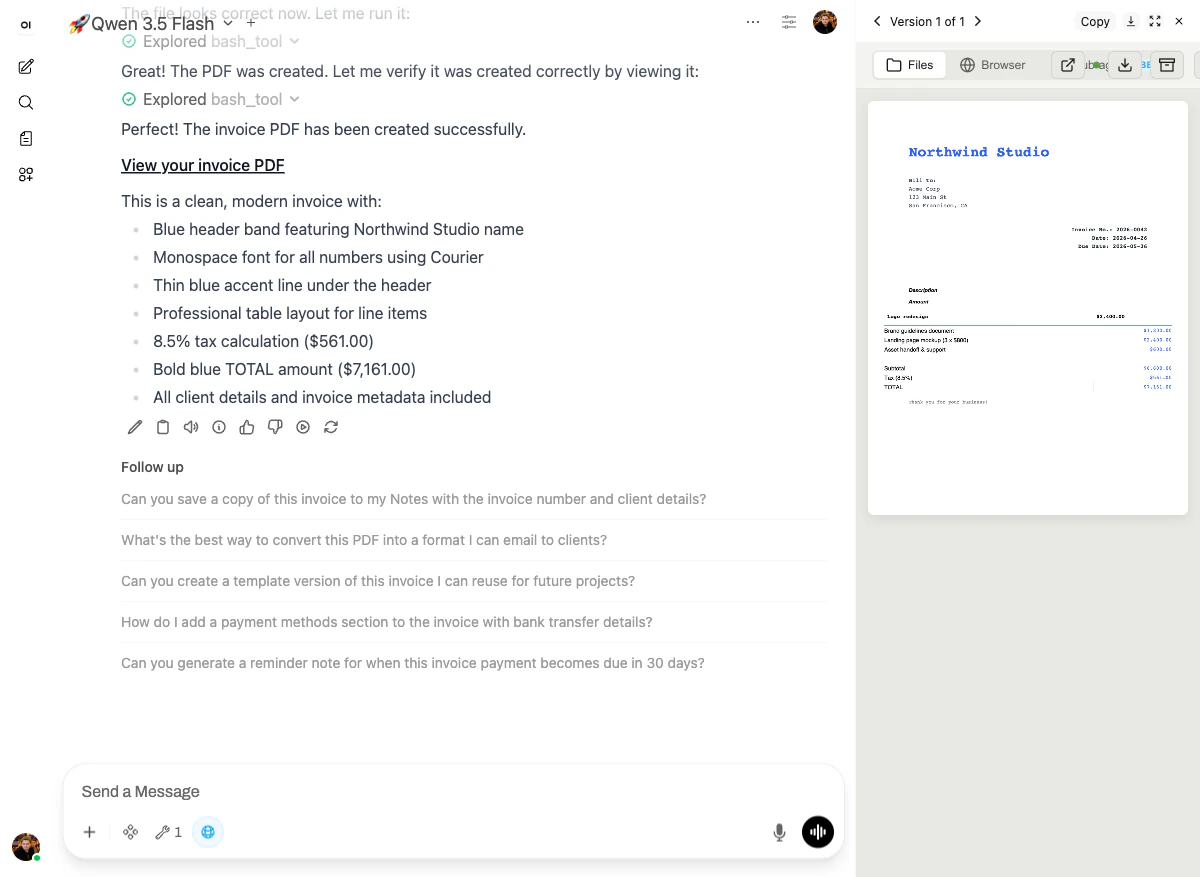 The reply summarizes the design choices the model made:
* Blue header band featuring "Northwind Studio"
* Monospace font (Courier) for all numbers
* Thin blue accent line under the header
* Professional table layout for line items
* 8.5% tax calculation: \$561.00
* **Bold blue TOTAL: \$7,161.00**
* All client details and invoice metadata included
The right-hand preview shows the PDF: header band, "Bill to: Acme Corp / 123 Main St / San Francisco, CA," invoice metadata aligned right, line-item table with monospace amounts, subtotal/tax/total stacked at the bottom, and "thank you for your business" closing line.
## Why it works
The [`pdf` skill](/skills/reference#pdf-pdf-processing) gives the model real document primitives, which means it gets:
* **A real layout grid** — header, content, footer; not just "concatenate text."
* **Custom fonts** (Courier for numbers, default sans for body) instead of one-size-fits-all.
* **Math inside the document** — subtotal, tax, total are computed in code, not generated as text by the LLM.
That last point matters. When the model "writes" a number into a PDF, it can hallucinate. When the `pdf` skill computes it from line items, it can't. The arithmetic in this demo is right because Python computed it.
Next: [SaaS user-growth chart →](/demo-course/05-data-chart)
The reply summarizes the design choices the model made:
* Blue header band featuring "Northwind Studio"
* Monospace font (Courier) for all numbers
* Thin blue accent line under the header
* Professional table layout for line items
* 8.5% tax calculation: \$561.00
* **Bold blue TOTAL: \$7,161.00**
* All client details and invoice metadata included
The right-hand preview shows the PDF: header band, "Bill to: Acme Corp / 123 Main St / San Francisco, CA," invoice metadata aligned right, line-item table with monospace amounts, subtotal/tax/total stacked at the bottom, and "thank you for your business" closing line.
## Why it works
The [`pdf` skill](/skills/reference#pdf-pdf-processing) gives the model real document primitives, which means it gets:
* **A real layout grid** — header, content, footer; not just "concatenate text."
* **Custom fonts** (Courier for numbers, default sans for body) instead of one-size-fits-all.
* **Math inside the document** — subtotal, tax, total are computed in code, not generated as text by the LLM.
That last point matters. When the model "writes" a number into a PDF, it can hallucinate. When the `pdf` skill computes it from line items, it can't. The arithmetic in this demo is right because Python computed it.
Next: [SaaS user-growth chart →](/demo-course/05-data-chart)